### HP Prime G2 The [HP Prime](https://en.wikipedia.org/wiki/HP_Prime) is a graphing calculator on the market since 2013, with a hardware revision in 2018 (the G2 model). It has a touch screen and as far as I can find, most people [are happy with it] (https://web.archive.org/web/20260724185724/https://www.cemetech.net/forum/viewtopic.php?t=15835&start=0) and find it [a very capable] (https://web.archive.org/web/20260724185754/https://www.techpoweredmath.com/hp-prime-review/) and fast calculator. [Here are] (https://www.hpmuseum.org/forum/thread-5373.html?highlight=internal) some pictures of the opened up calculator and [here] (http://www.educalc.net/page/2336261/) is a website with some more downloads. I'm not really interested in the calculator part. For most calculations I do for my day job, embedded programming, the HP-16C is a better fit. I was interested in this device because I found posts online suggesting it could run Linux and even a Windows 10 port. ### Bow for me for I am root I do have a [history running Linux on older HP devices] (/s/blog/My_24_year_old_HP_Jornada_can_do_things_your_modern_iPhone_still_cant_do.html) and I do like to have full privilege on all devices I own. Back then I wrote: > I have a rule that I try to adhere to for devices I own. They must allow a means of root or administrative actions. The Nintendo Switch I got second hand is old enough to be jailbroken. The two Apple devices I own (a first gen iPad Air and first-gen iPhone SE) have vulnerabilities that give me root access. All Android phones I owned I've specifically bought because the bootloader can be unlocked. Once I buy a device, it is mine and I decide what to do with it. Not the manufacturer. Otherwise it is e-waste the moment it leaves the factory. > Being able to develop software on a device is almost a must have as well for me. Missing functionality, otherwise known as stuff the manufacturer does not make (enough) money on, can be programmed back in as long as you can develop on a device and are willing to put in enough time and/or money. Now with a calculator that isn't a huge issue since I don't see them as general purpose computing devices. Although Texas Instruments did later on removed and restricted features that their device shipped with initially, namely [running assembly code on your calculator] (https://web.archive.org/web/20260724191414/https://www.hackster.io/news/texas-instruments-under-fire-for-removing-asm-c-programming-features-from-ti-83-ti-84-calculators-ba55bdcb0547) and Numworks also [locked down their calculators] (https://news.ycombinator.com/item?id=30823180). That all has to do with cheating and exam mode, so I do understand that part. If your device is not allowed on official exams / tests, it won't be used or sell well. On the HP Prime there never was assembly (only a custom basic like language called PPL) so they can't take that away. There is a [quote from an HP employee stating] (https://www.hpmuseum.org/forum/thread-13288-post-139158.html#pid139158): > "It is not locked down and is just used for verification at this time. Note however, we DO have the ability to fully encrypt and lock the system to hell as that is part of the new chip. We DO have that tested and working. We WILL turn it on if needed. It IS a corporate security mandate (after things like firmware being loaded into mice/keyboard or printers to hack networks came to light) that we fought to get an exemption for. **Nobody dick around with exam mode.**" ### Hardware specs for a calculator!? The Prime G2 is comically overpowered for a calculator if you ask me. It has an i.MX 6 Ultralite ARM Cortex A7 CPU, 256 MB DDR3 RAM and 512 MB of internal storage. I mean come on! It's closer to a small embedded Linux machine with a calculator keyboard attached than to a traditional calculator. The G1, the previous hardware revision already had a 400MHz ARM CPU with 32MB ram, but the G2 is like an Android phone of a few years back. The coffee machine hardware I work on at my day job has an i.MX6 module with comparable specifications. And that runs dedicated C++ and Qt applications on top of Yocto. The HP Prime G2 runs on [FreeRTOS] (https://www.hpmuseum.org/forum/thread-13914-post-133852.html?highlight=freertos#pid133852) and the G1 runs on a custom RTOS named [Besta OS] (https://en.wikipedia.org/wiki/HP_Prime). I'm still shocked by the specifications, for a calculator! In daily usage it is very responsive and compared to other calculators, calculations are way faster, graphing is faster and via the touchscreen you can zoom/scale graphs, which is also almost instant. So they do put those specs to good use at least. ### Hardware specs for other calculators Let's check what their competitors have regarding specifications and possible Linux support. I've tried to find specifications of a few models available here in The Netherlands. The [TI 84+ CE has an 48 MHz eZ80] (https://en.wikipedia.org/wiki/TI-84_Plus_CE_series). No linux there. The [Numworks Graphing Calculator N0110] (http://web.archive.org/web/20260717132526/https://www.numworks.com/engineering/specs/) has a 216 MHz ARM Cortex-M7 CPU, 8 MB storage and 256 KB of SRAM. I still find 216 MHz to be way more megahertz than you'll probably need for a calculator, but who am I to judge. The later [N0120] (https://en.wikipedia.org/wiki/NumWorks) model even has a ridiculous 550 MHz ARM Cortex-M7, but a more reasonable 564KB of RAM. Then we're talking microcontroller levels of RAM. No linux here, but the [OS is open source] (https://github.com/numworks/epsilon). There are even a few forks, but it seems that later firmware versions are locked down. Sad for enthousiasts, but probably it has something to do with cheating and exam mode. The [Casio FX-CG50] (https://www.casio.com/nl/scientific-calculators/product.FX-CG50/) doesn't list cpu specifications but [this post] (http://web.archive.org/web/20260717135211/https://community.casiocalc.org/topic/7861-a-few-questions-about-the-cg50/) says 118 MHz and [this post] (https://www.hpmuseum.org/forum/thread-7584-page-2.html) says the type, a custom [Renesas SH7305](https://en.wikipedia.org/wiki/SuperH) CPU, 8 MB of RAM and 32 MB of ROM. No linux there either. Although, maybe [this guy] (https://dmitry.gr/?r=05.Projects&proj=07.%20Linux%20on%208bit) can make it work. The only other calculator I found with [a linux port] (https://hackaday.com/2012/11/12/linux-on-a-nspire-cas-cx-calculator/) is the TI Nspire CX (II) (CAS). Here is an [article on running Arch Linux] (https://lovesegfault.com/posts/arch-on-the-nspire/) on it and [here] (https://www.hackspire.org/Linux/) is more info. The CX-II has a [396MHz ARM CPU](https://en.wikipedia.org/wiki/TI-Nspire_series) with 64MB RAM and 128MB of flash storage. Not as much as the HP Prime, but still Linux capable. My favourite calculator, the HP-16C, is a different story. This is not a competitor because it has no graphing features and its not exactly modern. The [NUT CPU detailed description (A-1LF5-9002-1 - 7/14/81)] (/s/inc/img/nut2.jpeg) states 200 to 230KHz for the 11C/12C and 340 to [380KHz for the 41C](/s/inc/img/nut1.jpeg). There is [a definition in the Nonpareii emulator] (https://github.com/brouhaha/nonpareil/blob/c347bc1ab20170c253512042f7aac0d952f304ea/ncd/16c/16c.ncd.tmpl#L20) stating 215 kHz, a [post here by Nelson M. Sicuro from 2003] (https://www.hpmuseum.org/cgi-bin/archv014.cgi?read=48758) suggesting about 230 kHz and [this page] (http://web.archive.org/web/20260717121051/https://www.finseth.com/hpdata/hp15c.php), stating 220 kHz. And 203 bytes of storage for programs. No Linux there sadly. I don't have a big calculator collection nor am I an expert on calculators. I used them in high school and further in my education whenever math was involved. I stil have a TI-83 somewhere from those days. And a HP 11C, the non programmer, regular version of the HP 16C. I like that the 11C is RPN. For math, that just clicks better in my head. ### HP Prime G2 Linux For the G2 [there is an old unsupported port] (https://web.archive.org/web/20260310130115/https://www.zephray.me/post/hp_prime_g2_linux/) with a 4.14 kernel. The linked linux repo no longer has the correct branch, buildroot failed, the devicetree file was messed up and the provided download doesn't show a console login, so I couldn't really use it. But it provided enough info to get started. I've updated the port for my HP Prime G2, with some enhancements: - Make the keyboard better, you couldn't enter numbers or characters like pipe, a dash or an underscore. - Shows up as an USB serial device - Runs in RAM but allows a larger than 15MB image. - My unit has a newer touchscreen controller (Ilitek ILI211X, due to the old Goodix GT5688 [being out of production](https://tiplanet.org/forum/viewtopic.php?f=55&t=23455&p=250857&hilit=ilitek#p250857)), made a kernel driver for it. - You can login to the console - The X11 server works and has a few basic apps - Ships with Doom (prboom) at a great framerate - Ships with a C compiler for on device development After reconstructing the repo's using [software heritage] (https://www.softwareheritage.org/) I was able to get a build up and running. I only tried running this in RAM, not wanting to flash the NAND and potentially loose the original calculator software. 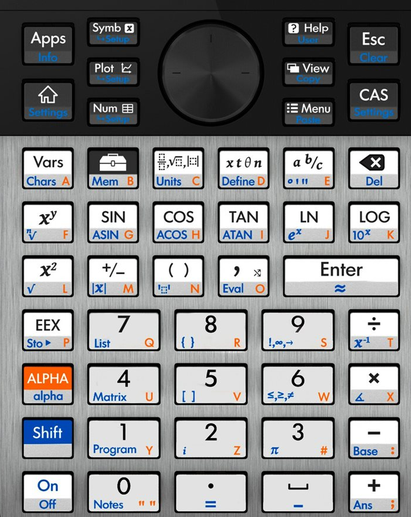 The keyboard in Linux was only sending the orange marked letters, no dashes, underscores, numbers or a pipe character. At first I made an alternative keymap which [loadkeys](https://man.archlinux.org/man/loadkeys.1) configured at boot. However, that didn't work in X11, so I just patched up the kernels keyboard driver (`imx_keypad.c`) to send the correct keys. The patch intercepts keycodes and if the ALT key is pressed it sends a different keycode. See `input-event-codes.h` for the mapping. Using the Alpha key (ALT) you can enter numbers and some other special characters. Pressing the ALT key together with e.g. COS or TAN failed to send a keycode. I didn't look into that further, just used other keys. It might have to do with the keyboard [matrix] (https://www.zephray.me/post/hp_prime_g2_reverse_engineering/). The original build's `uuu` scripts could boot Linux in RAM, but only a 15MB max build. By changing offsets in the kernel configuration, `uuu` script and u-boot you can now run an image up to 130 MB from RAM. The original port did not boot up to a login screen but that was just a case of configuring `getty` in the init scripts. The original build and a few articles in Russian ([here] (https://habr.com/en/companies/ruvds/articles/587436/), [here] (https://habr.com/en/companies/ruvds/articles/544372/) and [here] (https://habr.com/en/articles/477250/)) had a working touchscreen using a Goodix kernel driver, but in my build that did not work. It claimed to be on i2c bus 1 address `0x14` but `i2cdetect` showed no such address. It did show a mystery device at `0x26`, which while poking around showed a data structure changing while touches were sent. After much fiddling and looking at raw i2c messages I found out that it looked comparable to an `Illitek ILI211X` device. Newer kernels [have a driver] (https://github.com/torvalds/linux/blob/master/drivers/input/touchscreen/ili210x.c) and the `ILI211X_DATA_SIZE` matches my observations for a 43 byte data packet on i2c, a `0x5a` start byte and the `0x26` address matched with [another imx6 devicetree with that driver] (https://github.com/torvalds/linux/blob/fc02acf6ac0ccde0c805c2daa9148683cdd01ba8/arch/arm/boot/dts/nxp/imx/imx6q-logicpd.dts#L79). The HP recovery screen showed the touchscreen fw version as `ilitek-03` which also was a hint. This old kernel has no driver for that model, only for older ones with a different protocol. I coded up a kernel driver based on the newer kernel driver, but stripped out all non-essentials, for example multitouch and finger pressure. I also made a calibration tool `fbtouch_test` since my screen had some oddities in the bottom right corner. Later I found a [french forum post](https://tiplanet.org/forum/viewtopic.php?f=55&t=23455&p=250857&hilit=ilitek#p250857) that stated that HP switched screens due to the Goodix ones not being in production anymore. 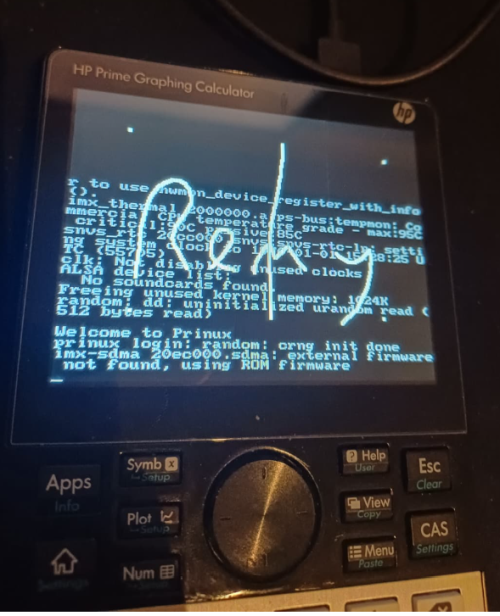 > Working touchscreen During debugging I found that modprobing the kernel module for usb serial support locked up the entire device. I changed that from a loadable kernel module to compiled in the kernel, which gave no crash anymore. I can now connect via serial to my calculator. With touch support working I could also include X11 and a few programs. Once you're logged in on the console, type `startx` and `twm` will start together with `xeyes`, `xclock` and `xcalc`. Mouse and keyboard inputs work. Have fun running `xcalc` on your calculator. A long press is interpreted as a right click. For fun I added `tcc`, the [tiny c compiler] (https://en.wikipedia.org/wiki/Tiny_C_Compiler). Because what good is a calculator if you can't compile your own code on it? There is a small sample `hello.c` file in `/root` which you can compile (`tcc hello.c -o hello`) and run (`./hello`) yourself. The source code is available on my github: - [linux](https://github.com/RaymiiOrg/prinux-linux) - [buildroot](https://github.com/RaymiiOrg/prinux-buildroot) - [u-boot](https://github.com/RaymiiOrg/prinux-uboot) - [prime-linux](https://github.com/RaymiiOrg/prinux-prinux) For convinience I've made a [pre-built download] (/s/inc/downloads/prinux-flash_utility.zip) you can directly run without compiling the entire thing. buildroot and linux take quite a while to build and might bitrot over time. With the pre-built download you can get started right away playing. ### Instructions for running Linux on the HP Prime G2 **Beware that you need to open up your calculator and you might damage it, unrecoverable, not being able to boot into the HP software.** Continue with caution. Download the pre-built package from [HERE] (https://github.com/RaymiiOrg/prinux-prinux/releases) and extract it to a folder. Download `uuu` from [here] (https://github.com/nxp-imx/mfgtools/releases). Open the calculator (remove 4 screws from the back, open the housing with a small pry tool or guitar pick), plug it in via USB and press the RESET button while shorting 2 pads marked on the photo: 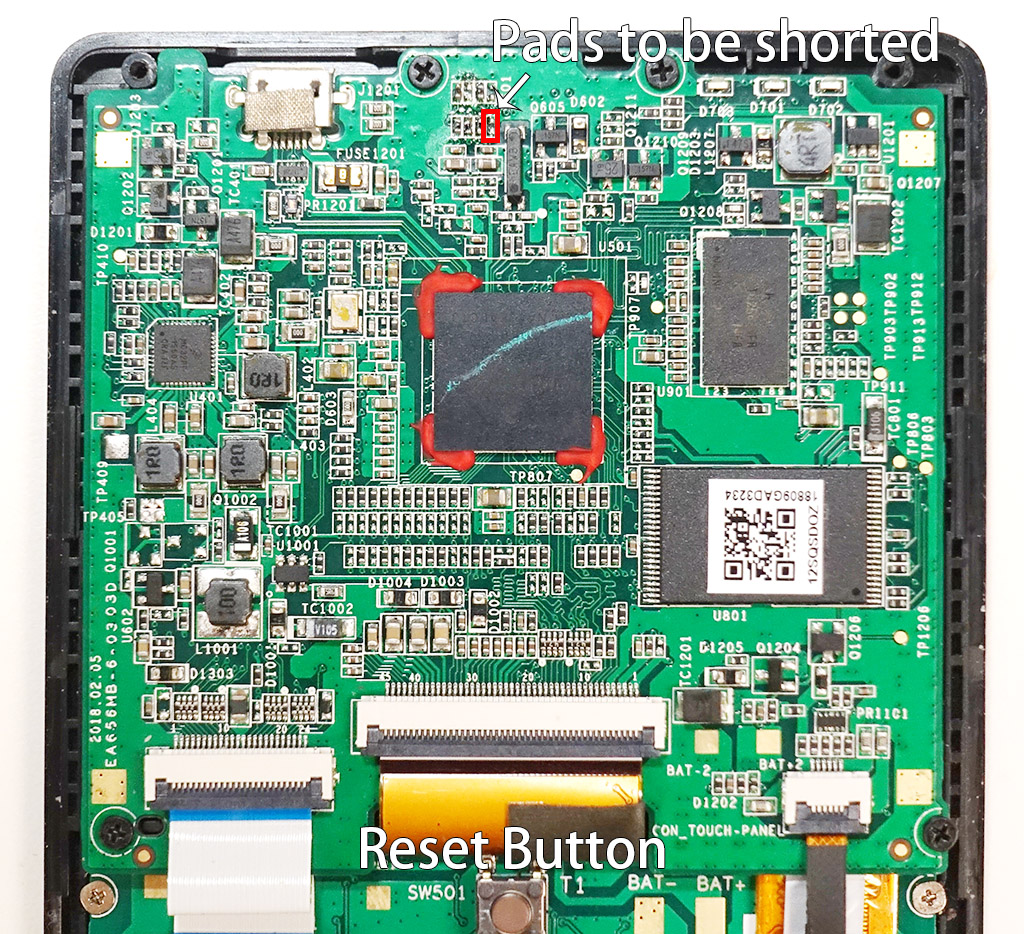 I've used an iFixit tweezer to short those two pads, they're tiny. Use the `uuu` script to boot Linux in RAM: uuu ./run_linux_in_ram.uu After a few seconds you should see a login prompt. You can login as `root` without a password. Type `startx` to start the graphical environment. Type `sh ./doom.sh` to start Doom. I have not tested any of the NAND flashing scripts so use those at your own risk. The Goodix touchscreen should still work, but I cannot test that. If you have a unit with that type of screen, please test and let me know. ### HP Prime G1 Linux For the Prime G1 there is a forum topic and screenshot [here] (http://web.archive.org/web/20210517144345/https://www.omnimaga.org/hp-calculator-programming-and-support/prime-linux/) and [this port](https://github.com/Repeerc/Linux-For-HPPrime-V2) has actual source code and a modern 6.x kernel. I don't have G1 hardware so I cannot test this version. The port provides no downloadable image, you have to build one yourself. The instructions are on the page, but a bit tense. Note that this is specifically for the G1 hardware version. I did try to build this version myself to see if there was much bit rot or broken links, but surprisingly it all went quite smooth still. First clone all 4 repo's: mkdir prime-linux cd prime-linux git clone https://github.com/Repeerc/Linux-For-HPPrime-V2 git clone https://github.com/Repeerc/hpprimev2_linux_loader git clone https://github.com/Repeerc/Kernel-6.1.35-HP-Prime-V2_G1 git clone https://github.com/Repeerc/buildroot_hpprimev2 Build the loader: cd hpprimev2_linux_loader mkdir build cd build cmake .. make cp BOOT1.ROM ../../ If you receive an error like `error: unknown type name 'caddr_t'`, replace that type with `void` in the code. Modern compilers don't support that anymore. Build the kernel: cd ../../ cd Kernel-6.1.35-HP-Prime-V2_G1 make ARCH=arm CROSS_COMPILE=arm-none-eabi- hpprimev2_defconfig make ARCH=arm CROSS_COMPILE=arm-none-eabi- zImage -j8 cp arch/arm/boot/zImage ../../ Build `buildroot`: cd ../../ cd buildroot_hpprimev2 make hpprimev2_defconfig make cp output/images/rootfs.jffs2 ../../ Package it all up together: cd ../../ cp BOOT1.ROM Linux-For-HPPrime-V2/ cp zImage Linux-For-HPPrime-V2/ cp rootfs.jffs2 Linux-For-HPPrime-V2/ cd Linux-For-HPPrime-V2/ bash ./mkimg.sh Flash `BOOT1.ROM` and `LINUX.DAT` to the calculator: Use `usbtool.exe`, connect the calculator in Recovery Mode (`RESET + Symb`) , select Auto update then click Update. There are [documents online] (https://hp-prime.de/files/composite_file/file/169-hp-prime-support-notice-2015-04-27.pdf) suggesting this won't work with a USB3 port. Here are a few screenshots I found online. Prime G1 screenshot from the 2017 forum topic: 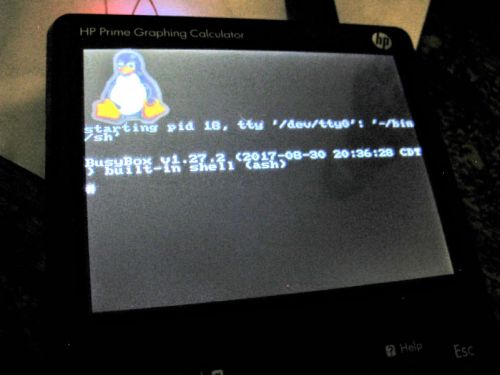 Prime G1 running an X session: 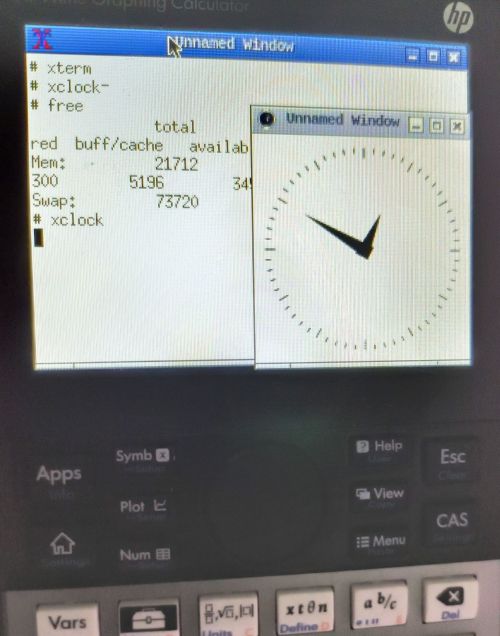 Prime G1 also has a Doom port: 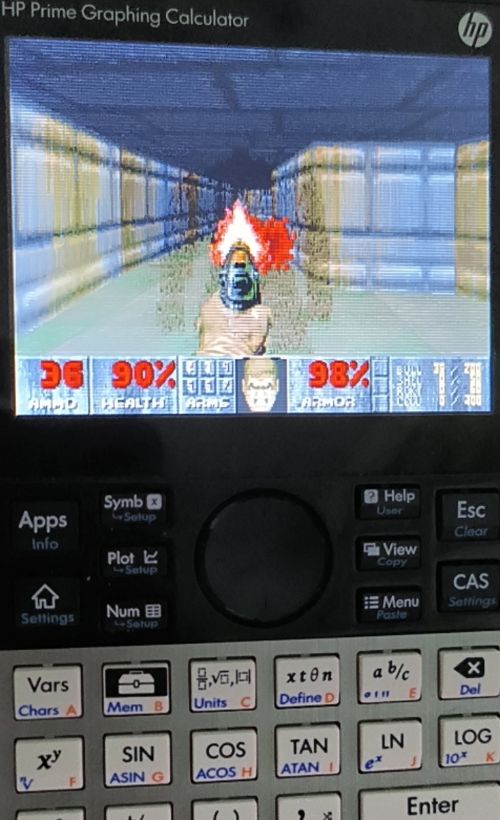 ### Windows?! If you're that kind of person, someone [ported UEFI for Windows 10] (http://web.archive.org/web/20260713225725/https://www.imbushuo.net/blog/archives/725) ([source] (https://github.com/imbushuo/PrimeG2Pkg)). Check out the most meta picture ever, Windows `calc.exe` on an actual calculator: 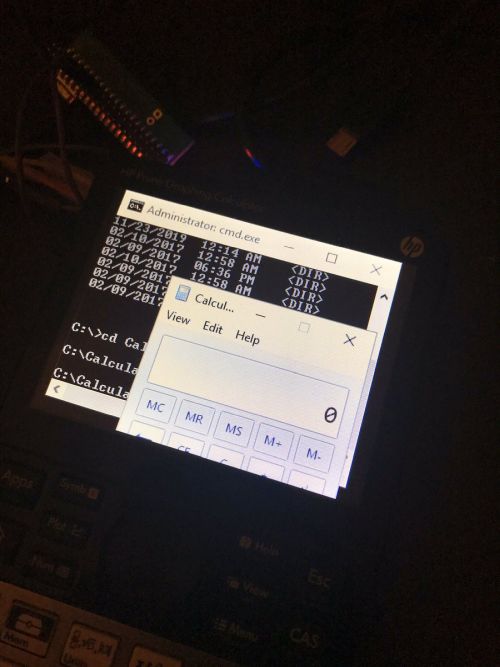 I cannot find any downloadable image and some links on the blog post to twitter are deleted so I cannot test this build myself. There are a few more screenshots: Failed bootloader: 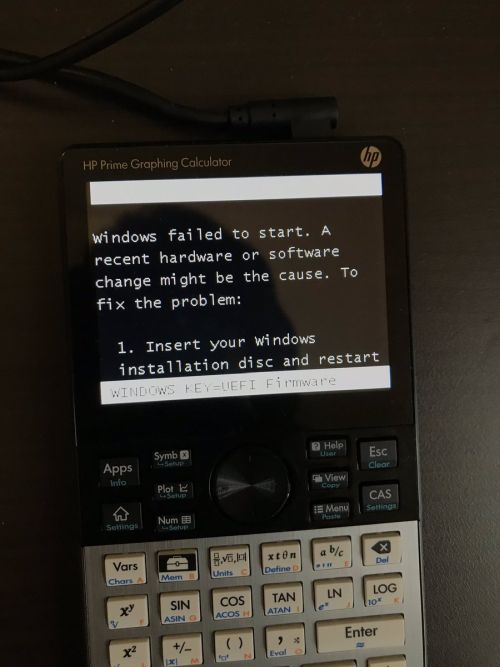 The boot screen: 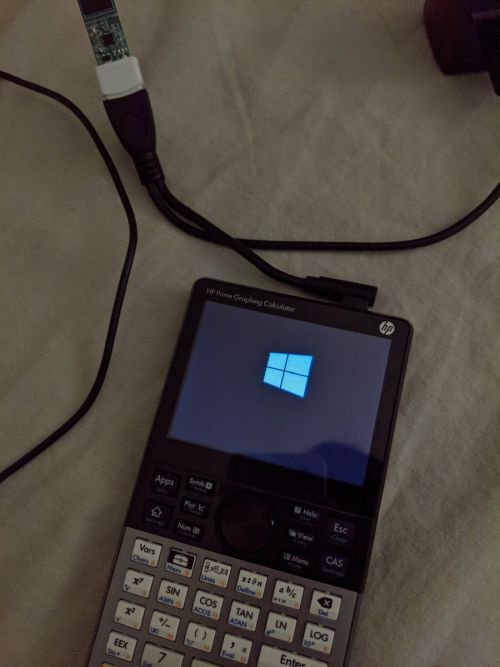 The print dialog: 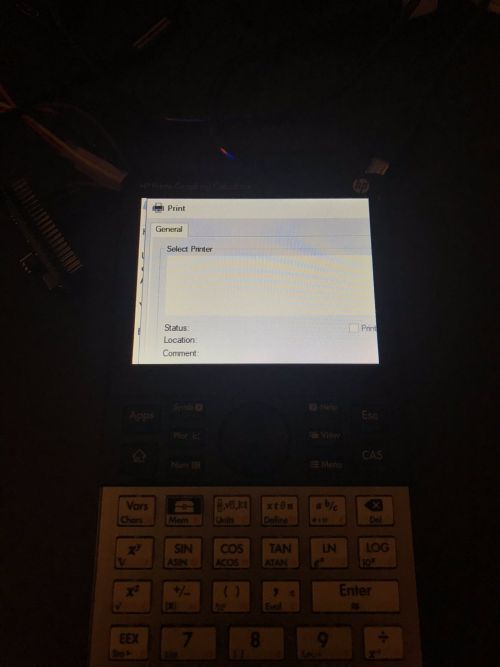 Notepad: 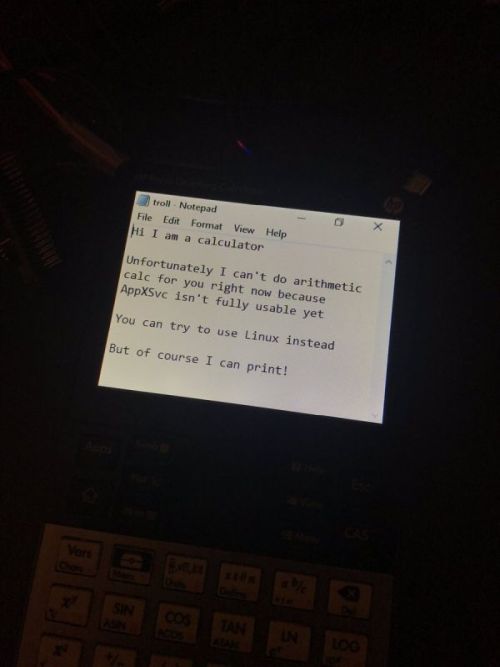 --- License: All the text on this website is free as in freedom unless stated otherwise. This means you can use it in any way you want, you can copy it, change it the way you like and republish it, as long as you release the (modified) content under the same license to give others the same freedoms you've got and place my name and a link to this site with the article as source. This site uses Google Analytics for statistics and Google Adwords for advertisements. You are tracked and Google knows everything about you. Use an adblocker like ublock-origin if you don't want it. All the code on this website is licensed under the GNU GPL v3 license unless already licensed under a license which does not allows this form of licensing or if another license is stated on that page / in that software: This program is free software: you can redistribute it and/or modify it under the terms of the GNU General Public License as published by the Free Software Foundation, either version 3 of the License, or (at your option) any later version. This program is distributed in the hope that it will be useful, but WITHOUT ANY WARRANTY; without even the implied warranty of MERCHANTABILITY or FITNESS FOR A PARTICULAR PURPOSE. See the GNU General Public License for more details. You should have received a copy of the GNU General Public License along with this program. If not, see